🚀 Robotic Observatory Control Kit
The Robotic Observatory Control Kit (rockit) is a modular observatory control system for robotic observatory facilties.
It operates telescopes at the Warwick Telescope Facilities at the Roque de Los Muchachos Observatory, the Warwick campus Windmill Hill observatory, and supports GOTO-South at Siding Spring Observatory.
rockit is designed as a set of single-purpose system services (daemons) that communicate over a remote procedure call interface (currently Pyro4). The services each run on the machine that is most appropriate, and the software is managed using individual git repositories and rpm packages for each logical component.
Spreading the code over many repositories, packages, and machines might seem overly complicated at first, but this has several benefits over a single monolithic software bundle:
- Everything is self-documenting and repeatable: each git repository and rpm package includes or explicitly declares all other code needed to run that component.
- The git repository (and generated rpm packages) provide the canonical state and configuration - setting up a replacement machine can be done automatically by installing the appropriate packages.
- RPM packages are automatically generated, with automated (date/revision) version numbers for Rocky Linux 9 each time a change is pushed to the repository's master branch.
Machines use a system-wide python (currently 3.9) installation that is managed using rpm packages for installation and upgrades. If you need to introduce a new python module as a dependency then you should add it to the python-dependencies repository instead of using pip. This ensures a documented and repeatable versioning for all dependencies.
Daemons can be grouped within a few core systems, explained below (click to expand)
The environment daemon, environmentd, acts as a central hub aggregating the weather status for a site.
It is configured to poll all of the relevant weather sensors (both internal and external) for all of the telescopes on the site, and then tracks their status over a configurable window (typically 20 minutes) to report min/max values and assign a status (safe/warn/unsafe) based on defined safety limits and the timeout window (i.e. a sensor must report safe for 20 minutes before its status will change). The polling topology is illustrated in Figure 1 below.

environmentd polls heterogeneous information from daemons distributed across the local network to aggregate all relevant site environment data.
Daemons which need to access this environment data (e.g. determining whether its safe to open the dome, writing image metadata, the web dashboard) query environmentd and select the information that is relevant to them (a telescope in Dome 1 rarely needs to know anything about the internal state of Dome 2). This is illustrated in Figure 2 below.

opsd, pipelined, the environment terminal command, and the web dashboard, pull environment information from enivironmentd.
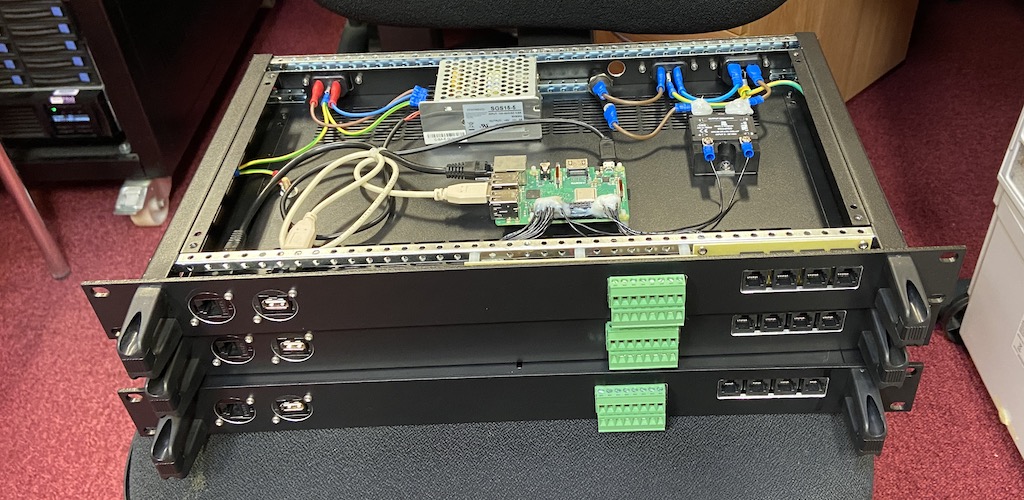
Internal dome conditions monitoring has been centralised into a custom rack-mounted device, built around a Raspberry Pi (see Figure 3 below). This domealert device is designed to be compatible with RoomAlert brand temperature/humidity probes, and also features switch sensors, a USB microphone (for web dashboard streaming), and a switchable mains-power pass-through for controlling a dehumidifier.
The data pipeline consists of the camera control daemons (camd plus camera-specific plugins), and the image processing daemons (pipelined plus pipeline_workerd).
camd is responsible for capturing an image and saving it to disk, with sufficient blank space reserved in the fits image headers for pipeline_workerd to insert additional information about the environment, instrument status, target information, etc.
pipelined provides a single access point for enabling/disabling metadata calculations, and for interactive users to register ds9 frame previews. All of the actual work is performed by the pipeline_workerd instances (one per camera). The pipeline_workerd runs on the same computer as camd which may be a different computer to where the rest of the telescope control is managed (see Figure 4).

pipelined can be configured to process the image data to derive quantities of interest to the operations control (see section below) or an interactive user. These include things like WCS solutions (enabling precise field acquisition), half-flux diameters (for automatic focusing), and collapsed image profiles (for auto-guiding). This information is written into fits header keys, and the full image header is sent to the operations daemon after each frame is processed.
The operations daemon, opsd provides the high-level robotic control for a telescope system.
When dome control is set to automatic, opsd is responsible for checking the environment and observation schedule to determine whether the dome should be open, and pinging the dome heartbeat. The dome heartbeat (implemented with a micro-controller for Astrohaven domes; the half-metre roof controller, and the Ash dome daemon) provides a fail-safe that will automatically close the dome if it does not receive regular updates from opsd.
When telescope control is set to automatic, opsd will follow an observing schedule defined by the user (as a json plan file). An observing plan consists of a series of actions, with each action implementing a unit of observation logic (e.g. taking skyflats, focusing, acquiring images on a field). The action implements the logic (by communicating with the low level daemons) to configure the telescope hardware and data pipeline, and recieves notifications with metadata when frames are acquired (see the Data Pipeline section above) to enable closed-loop logic for e.g. automatic focusing or guiding.
Separately, most domes contain a dehumidifier daemon, dehumidifierd, which directly checks an internal humidity sensor and whether the dome is open, and toggles power to a dehumidifier if the humidity is too high and the dome is closed.
The web dashboard provides a (near-)real-time overview of the system, displaying current weather and operations status for each telescope. It also fetches webcam images and provides pass-through for live video and audio.
The weatherlog daemon separately polls relevant environment sensors and logs the results to a database, providing a long-term view of the environment history of the site.